

KGet
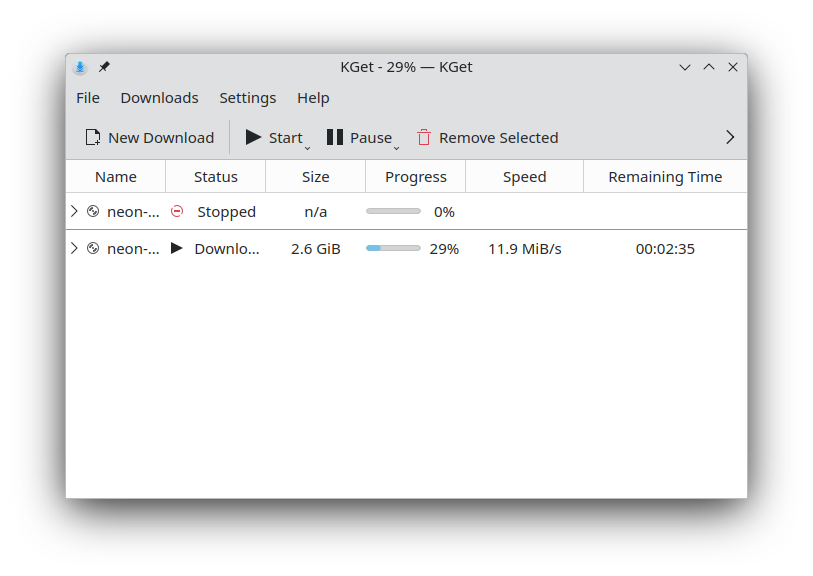
Read our comprehensive review of KGet, the advanced Linux download manager by KDE, designed to streamline and organize your internet file transfers.
Managing internet downloads on Linux requires a tool that balances power, control, and simplicity. KGet download manager, developed by the respected KDE team, is a mature utility designed to bring order to your file retrieval process. Whether you are grabbing large system ISOs, media files, or multiple documents simultaneously, this application acts as a central control tower for your bandwidth, ensuring that your transfers are efficient and organized.
Who Benefits Most from the KGet Download Manager?
This application is particularly suited for power users, developers, and Linux enthusiasts who regularly handle large or multiple file transfers. Standard web browsers often struggle with interrupted connections, offering little control over bandwidth or queue priority. If you frequently find yourself needing to pause downloads, manage network resources, or verify file integrity, this tool offers the precise control that standard browsers lack.
Key Features and Capabilities
The strength of this utility lies in its deep integration with the desktop environment and its robust feature set:
- Multi-Protocol Support: Seamlessly retrieve files via FTP and HTTP(S) sources depending on your hosting needs.
- Transfer Control: Easily pause, resume, or restart transfers, preventing lost progress during network dropouts.
- In-Depth Status Metrics: Gain complete visibility with comprehensive real-time data regarding current speed, estimated completion, and pending queues.
- System Integration: Embeds directly into the system tray for unobtrusive, background management, alongside tight integration with the Konqueror web browser.
- Metalink Compatibility: Utilize Metalinks to download from multiple mirrors simultaneously, leveraging built-in checksum verification for data integrity.
Optimizing Your Linux Workflows
The KGet download manager excels at minimizing interruptions. By handling the heavy lifting of network retries and file segmenting, it ensures that your system resources are used intelligently. Its ability to queue downloads means you can set up a long list of assets to retrieve overnight without manual intervention, making it an indispensable part of a productive Linux workstation.
Is It Right for You?
If you are looking for a reliable, open-source download companion that integrates beautifully with your desktop environment, this software is an excellent choice. To explore this tool further and add it to your setup, visit the official Flathub app page to get started.